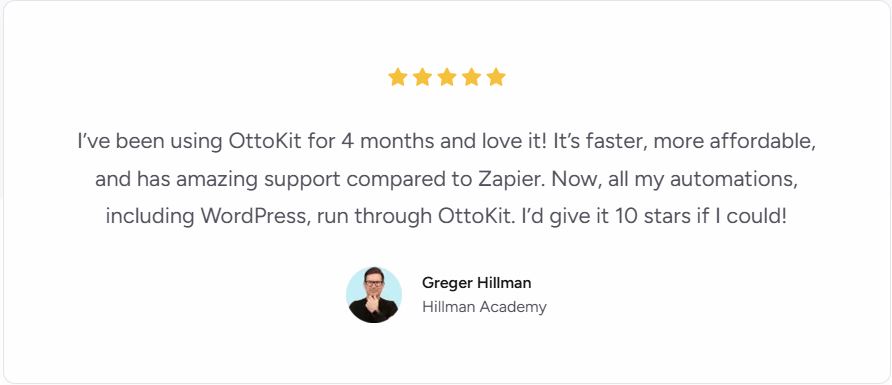


Automation tools have become indispensable for businesses, freelancers, and creators looking to streamline daily workflows, eliminate repetitive tasks, and connect disparate software systems without manual intervention. In a crowded space dominated by established players such as Zapier, Make (formerly Integromat), and n8n, OttoKit emerges as a fresh contender — particularly strong for WordPress-centric operations and AI-driven automation.
In this review, we’ll explore OttoKit’s capabilities, technical strengths, user experience, pricing, real-world scenarios, limitations, and whether it’s the right choice for your automation needs in 2026.
1. What Is OttoKit?
OttoKit is a no-code workflow automation platform that enables users to create powerful, multi-step automations connecting various apps, services, and platforms — all without writing code. Originally branded as “SureTriggers,” it has since evolved into OttoKit with enhanced features and AI integrations. It is especially known for its deep integration with WordPress, AI-powered automation builder, and flexible pricing options that include lifetime deals.
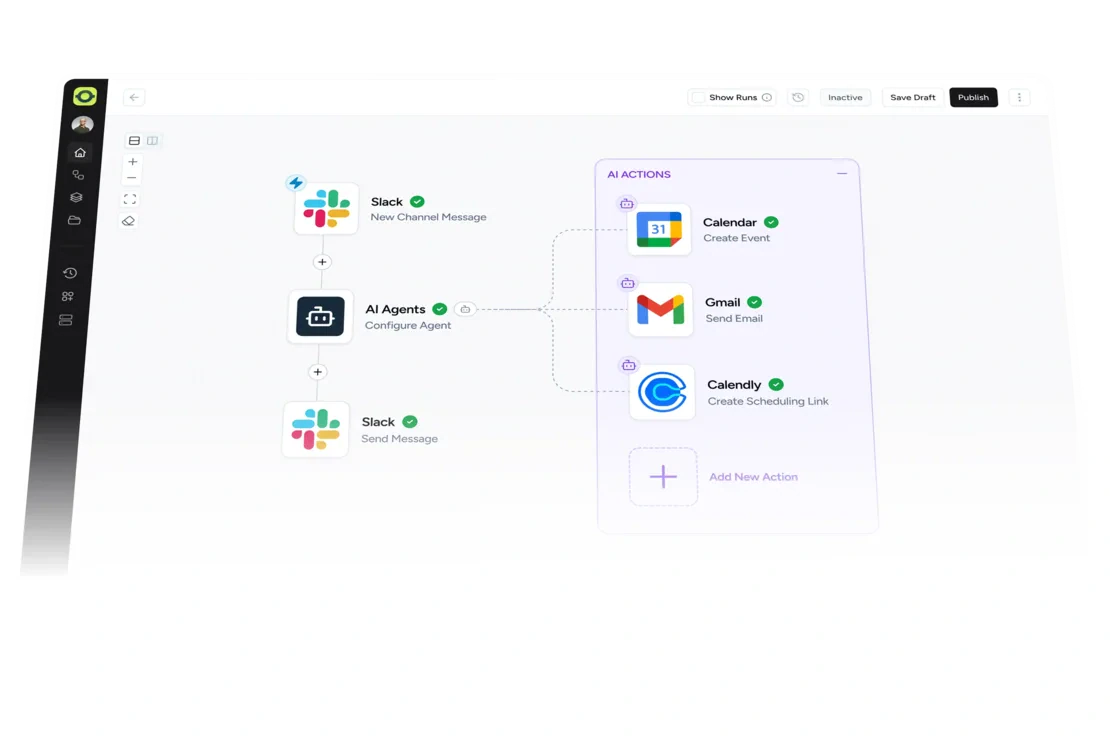
At its core, OttoKit allows users to define Triggers (events that start a workflow) and Actions (tasks executed after those events) and chain them together into complex workflows with conditions, delays, branching logic, and even AI agents that make decisions on behalf of the user.
Unlike many automation tools that rely solely on cloud SaaS connections, OttoKit combines cloud automation with WordPress plugin connectors, making it particularly strong for tasks that revolve around websites, content publishing, WooCommerce stores, and CRM syncs tied to WordPress.
2. Key Features and Capabilities
✅ No-Code Visual Workflow Builder
OttoKit offers a drag-and-drop, visual workflow canvas that lets you build automation flows intuitively. This approach is ideal for business users, marketers, and creators who want complex automation without writing technical scripts. The interface supports multi-step flows with loops, filters, delay actions, and branching logic.
These workflows can range from simple tasks — like sending an email when a form is submitted — to highly conditional, multi-system processes spanning CRM updates, database writes, AI text generation, and notifications.
🤖 AI-Powered Automation
One of OttoKit’s standout differentiators is its AI automation engine. Instead of manually specifying every parameter for an action, OttoKit’s AI can suggest triggers, fill task fields automatically, and even generate content within workflows. Users can harness natural language prompts to configure automations that previously would have required manual setup or code.
This feature not only speeds up development but also makes OttoKit accessible to non-technical users who want “smart” automation — where the system can interpret intent and fill details.

🔗 Wide Range of Integrations
OttoKit integrates with over 1,200 apps and services, spanning productivity tools, CRM systems, email platforms, form builders, SaaS applications, and more. These include major services like Gmail, Google Sheets, Slack, Mailchimp, Notion, WooCommerce, and countless WordPress plugins.
While services like Zapier still have more total integrations on paper, OttoKit’s depth — particularly for WordPress and web-centric use cases — makes it a strong choice for WordPress site owners, eCommerce teams, and content creators.
🧠 Human-in-the-Loop Controls
For certain workflows, user review or approval is essential before automation continues. OttoKit facilitates this through “Human-in-the-Loop” steps that pause execution until a designated person signs off — ideal for quality control or compliance workflows.
📊 Workspace and Collaboration Tools
OttoKit supports multiple workspaces, enabling agencies, teams, or consultancies to manage automation for clients or departments separately. Each workspace can include multiple users, permissions, and isolated workflow environments.
This organization feature is becoming increasingly important as businesses scale their automation efforts across departments.
📅 Workflow Logs, Replay, and Monitoring
Every automation run is logged, and failures can often be replayed without rebuilding them manually. These logs help administrators troubleshoot why workflows stopped or behaved unexpectedly — a crucial aspect for enterprise or business-critical automation.
📈 Templates, Recipes, and Community Contributions
OttoKit provides pre-built templates (often called “recipes”) that users can install and modify rather than building from scratch. This speeds up adoption and helps beginners learn best practices.
3. Real-World Use Cases
OttoKit shines in scenarios where automation can generate measurable business impact.
🛒 E-Commerce Automation
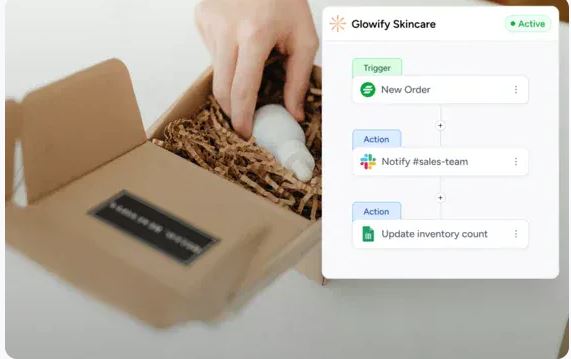
For WooCommerce store owners, OttoKit can automate tasks like:
-
Sending personalized order confirmation emails.
-
Syncing new customer data to CRM systems.
-
Triggering abandoned cart notifications or offers.
-
Updating loyalty or subscription systems.
This level of automation can significantly elevate customer experience while reducing manual workload.
📣 Marketing and Lead Management
OttoKit is a natural fit for marketing workflows:
-
Capture leads from web forms (or CRM) and automatically send follow-ups.
-
Tag and categorize prospects based on behavior.
-
Automatically sync leads to email platforms and CRM systems.
-
Segment audiences for drip campaigns.
Automation — once only the domain of enterprise systems — becomes accessible to small businesses and bloggers alike.
📄 Content and Publishing Workflows
For bloggers and content teams, OttoKit can automate:
-
Publishing content to social media when new posts go live.
-
Generating SEO metadata or summaries with AI.
-
Notifying team members about new content.
-
Translating or formatting content based on workflow triggers.
This can dramatically speed up content efforts while maintaining consistency.
🤝 Internal Workflow Automation
Even non-public tasks benefit:
-
Syncing HR onboarding forms with employee directories.
-
Automating ticket assignments in support systems.
-
Updating analytics dashboards or reporting tools.
-
Routine backups or database syncs.
This versatility is part of what makes OttoKit a valuable tool beyond external marketing use cases.
4. Pricing and Plans
OttoKit’s pricing structure includes:
🆓 Free Tier
-
250 tasks/month
-
Access to many core integrations
-
Basic automation builder
This free plan lets new users experiment with automation without cost or commitment, a strong incentive for beginners or folks exploring automation.
💰 One-Time Payment (Lifetime) Plans
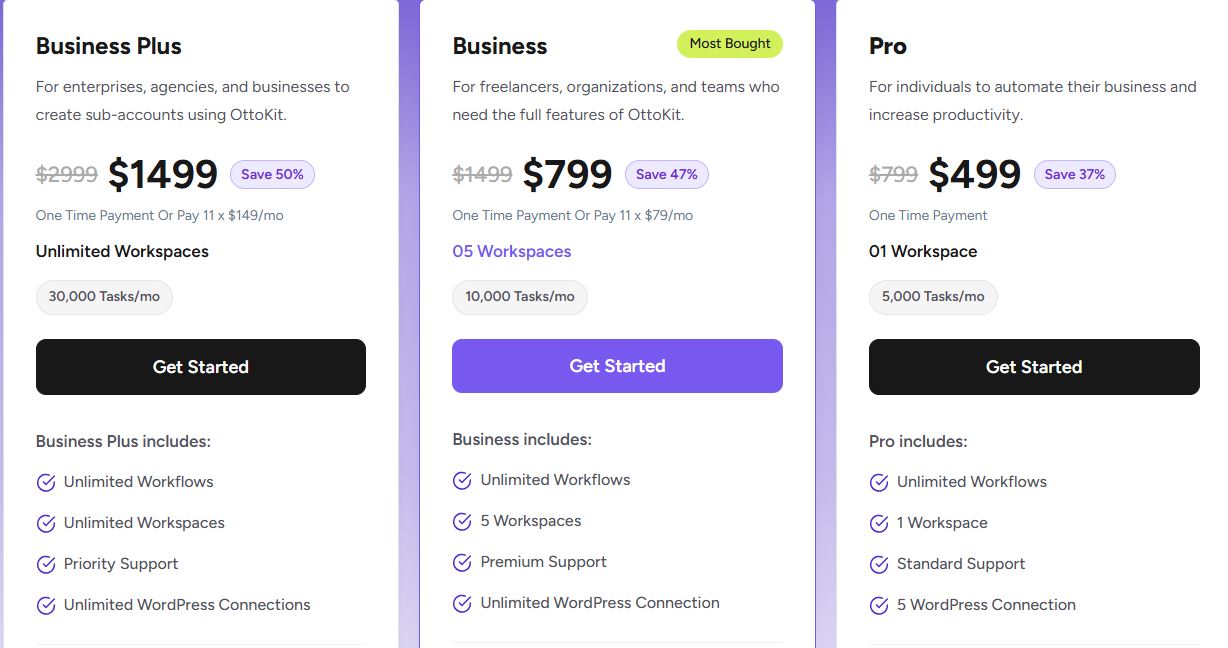
OttoKit is often sold with lifetime deals — one-time payments that unlock broader functionality, task limits, and priority support. These plans have typical tiers such as:
-
Pro — mid-tier features and moderate task limits.
-
Business — higher task limits and more workspaces.
-
Business Plus / Enterprise — top-tier with unlimited workspaces, advanced features, and robust task counts.
This lifetime pricing model is attractive compared to subscription-only tools like Zapier and Make, where recurring fees add up quickly.
📌 Money-Back Guarantee
OttoKit typically offers a 14-day money-back guarantee, which allows users to test the full suite risk-free before committing.
Whether you want to pay monthly or secure a lifetime license (often discounted), OttoKit provides flexibility.
5. OttoKit vs Other Automation Platforms
When comparing OttoKit with competitors like Zapier, Make, and FlowMattic, several distinctions emerge:
🆚 Zapier
-
More integrations overall (over 6,000 apps).
-
Mature platform with enterprise features.
-
Strong reliability and uptime guarantee.
OttoKit strengths over Zapier:
-
Native WordPress plugin integration.
-
Often more affordable lifetime pricing.
-
AI-driven automation suggestions.
-
Visual workflow builder that’s more optimized for WordPress use.
🆚 Make (Integromat)
-
Deep logic and looping support.
-
Very flexible and powerful builder.
OttoKit strengths:
-
Easier onboarding for beginners.
-
Strong WordPress ecosystem.
-
AI integration not baked into Make by default.
🆚 FlowMattic
-
Another WordPress-centric automation tool.
Distinctions:
-
FlowMattic is often praised for ease but can be more expensive at scale.
-
OttoKit may offer a broader set of advanced features like AI agents and more integrations.
Each tool has its niche. OttoKit’s sweet spot is especially WordPress automation with a layer of AI convenience.
6. Strengths — Why OttoKit Stands Out
✔️ AI-Enabled Automation Makes Setup Easier
For many automation tools, advanced work requires technical knowledge or precise logic planning. OttoKit incorporates AI support that allows users to:
-
Allow AI to complete action fields.
-
Suggest workflow paths.
-
Enable natural-language automation planning.
This is valuable for small teams or solo operators who don’t have developers on staff.
✔️ Affordable Pricing With Lifetime Options
OttoKit’s lifetime plans are a standout value, offering unlimited workflows, extensive integrations, and priority support with a one-time investment. It’s a compelling alternative to recurring subscription costs.
✔️ Deep WordPress Integration
Built originally around WordPress itself, OttoKit doesn’t just connect external services — it operates inside WordPress to automate events like post publication, user registration, WooCommerce events, and custom triggers that cloud-only tools struggle with.
✔️ Visual Workflow Design and Team Collaboration
OttoKit’s workspace features, team user roles, and drag-and-drop layouts make collaboration easier, particularly for agencies managing multiple client sites.
✔️ Strong Community and Frequent Updates
Active development — with release notes, multilingual support, new integrations, and added features like email templates — shows continued platform evolution.
7. Limitations & Common Complaints
While OttoKit has a lot going for it, it’s not without shortcomings.
⚠️ Security Issues in WordPress Plugins (Historical)
Security researchers identified critical vulnerabilities in older versions of the OttoKit WordPress plugin that allowed privilege escalation and administrative access. These issues were patched in 2025, but they highlight the need for vigilance and regular updates.
Users should ensure they run up-to-date plugin versions and monitor logs for suspicious activity.
⚠️ Workflow Reliability & Occasional Bugs
Some community and review feedback suggests occasional workflow stability issues, especially with complex flows or in early iterations of certain integrations. Continual refinement is ongoing, but users should be prepared for troubleshooting occasionally.
⚠️ Learning Curve for Complex Use Cases
Although beginner-friendly for simple automations, advanced logic — involving conditions, loops, external API calls, or hybrid AI workflows — may still require time and patience to master fully.
⚠️ Support Experiences Vary
Some reviewers have noted that support response times can be slow and communication quality varies — something to keep in mind for mission-critical projects.
⚠️ Not as Many Integrations as Zapier
While OttoKit’s integration count is impressive, Zapier still leads in sheer numbers of supported apps. However, the practical impact depends on what apps you actually need.
8. Community & Real-World Usage Feedback
Across Reddit and other user communities:
-
Many users appreciate the automation power and value, especially when replacing tools like Zapier for WordPress workflows.
-
Some users highlight reliability in their daily automation tasks, though error monitoring remains essential.
-
Others express concerns about pricing and positioning — particularly around upgrade nudges inside the interface.
These community discussions underscore that automation expectations vary widely — and no tool is perfect for every use case.
9. Final Verdict: Who Should Use OttoKit?
🎯 Best Fit For:
✅ WordPress site owners and WooCommerce stores
✅ Bloggers and content creators looking to reduce manual publishing work
✅ Small businesses seeking budget-friendly lifetime automation
✅ Agencies managing multiple workflows or client sites
✅ Users interested in AI-assisted automation setup
⚠️ May Not Be Ideal For:
❌ Teams needing the broadest possible app ecosystem (e.g., beyond 6,000+ integrations)
❌ Enterprises requiring advanced analytics dashboards or SLAs
❌ Users who want self-hosting and local execution
Conclusion
OttoKit is a compelling, feature-rich automation platform that blends no-code simplicity with AI-guided power. It stands out most for WordPress-centric workflows, its flexible pricing (including lifetime access), and its intelligent automation engine that lowers the barrier for non-technical users. While it faces competition from larger, more established platforms with broader integration catalogs, OttoKit’s design philosophy, workflow builder, and community momentum make it a worthy choice in 2026 — especially for entrepreneurs, agencies, and small businesses that want smart automation without writing code.
By embracing both technical depth and accessibility, OttoKit proves that automation tools can be powerful and approachable — even if your team doesn’t have a developer on standby.