
If you’ve spent any time buying ads on Meta, you already know the drill. You open the Ad Library to see what your competitors are running. You screenshot a few hooks that catch your eye. You paste them into a Notion doc that nobody looks at again. You open Canva to mock something up from scratch, because none of your old templates quite fit the angle you’re going for. Three tabs, two tools, and forty-five minutes later, you finally have something you can launch — and you’re still not sure if it’s actually going to convert.
Konvert (formerly known as Staticflow) was built to kill that workflow. It bills itself as “the system behind high-performing ads” — a single platform that merges competitor research, ad inspiration, a template library, and AI-assisted creative production into one place. Instead of stitching together the Meta Ad Library, a spy tool, Canva, and a shared drive, the pitch is that you do all of it inside Konvert.
I dug into the platform’s features, positioning, and public reviews to see whether that promise holds up. Here’s the full breakdown.
What Exactly Is Konvert?
At its core, Konvert is an all-in-one ad research and creation platform aimed at DTC brands, performance marketers, media buyers, agencies, and designers. The company describes its mission as building out a full “Creative Operating System” for modern brands — not just a spy tool, and not just a template library, but the connective tissue between the two.
That’s actually a meaningful distinction in this space. Most tools in the “ad intelligence” category pick a lane. Some are pure ad libraries that let you search and filter what competitors are running. Others are template marketplaces where you buy or subscribe to design assets. Very few try to own the entire pipeline — from “what’s working right now” to “here’s a finished creative ready to launch.” Konvert’s whole value proposition rests on collapsing that pipeline into a handful of connected tools rather than a scavenger hunt across five browser tabs.
The platform is organized around five core products: Templates, Scout, Explore, Collections, and AI Canvas, plus a Chrome extension and, more recently, a Konvert MCP integration for connecting directly with Claude. Let’s go through each one.
Templates: The Starting Point for Non-Designers
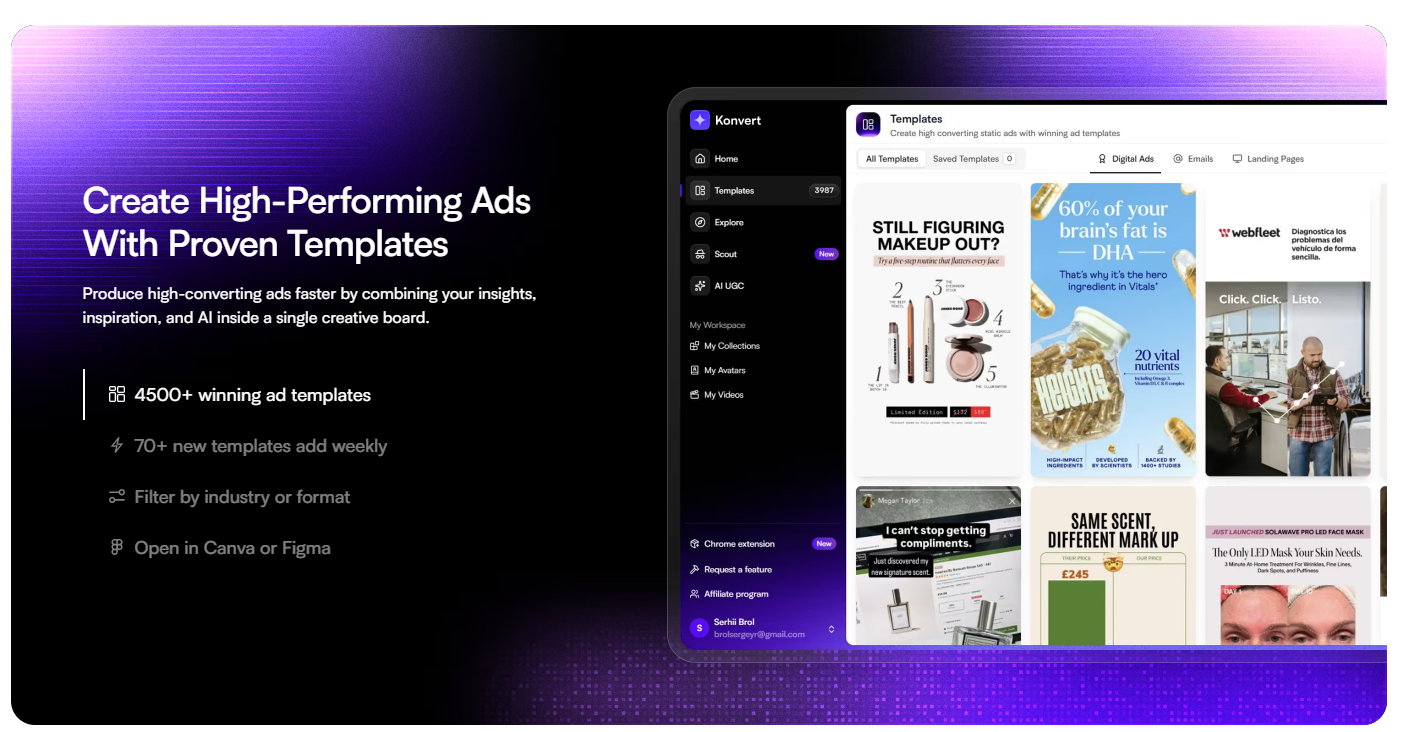
The Templates module is arguably Konvert’s most accessible feature, and it’s easy to see why it’s front and center in the marketing. The library ships with thousands of pre-built, high-converting ad templates, with dozens of new ones added every week. You can filter by industry or ad format, and — critically — open any template directly in Canva or Figma rather than being locked into a proprietary editor.
That last point matters more than it might seem. A huge number of “ad template” tools trap you inside their own clunky design software. By letting users pop templates straight into tools they already know, Konvert removes a lot of the learning-curve friction that kills adoption for smaller teams. If you or your designer already lives in Figma, you’re not being asked to relearn anything — you’re just skipping the blank-canvas problem.
For solo founders or lean marketing teams without a dedicated designer, this is probably the single most useful piece of the platform. Instead of paying a freelancer to mock up ten static ad variations, you can pull ten templates that are already structured around proven layouts — hook up top, social proof in the middle, CTA at the bottom, or whatever structure fits your format — and swap in your own copy, product shots, and brand colors.
The catch: template libraries are only as good as their update cadence and relevance filtering. A stale, generic template library is a liability, not an asset, because using the same visual structure everyone else is using tends to blend into the noise rather than cut through it. Konvert’s claim of 70+ new templates weekly suggests they’re aware of this and actively working against staleness, but it’s worth testing in practice whether the “industry” filters are granular enough to be genuinely useful for a niche vertical, versus just broad buckets like “e-commerce” or “SaaS.”
Scout: Your 24/7 Competitor Surveillance System
This is where Konvert starts to differentiate itself from a simple template shop. Scout is a competitor tracking tool that continuously scrapes and monitors Meta ads from brands you choose to follow. Instead of manually checking the Ad Library every few days to see if a competitor launched something new, Scout runs in the background and surfaces what’s changed.
Specifically, Scout is built to track:
- Top-performing hooks — the opening lines or visuals competitors are leaning on
- Top-performing landing pages — where that ad traffic is actually being sent
- Top-performing angles and selling points — the actual value propositions being tested
- Top-performing audiences and ad types — who they’re targeting and in what format
One user testimonial on Konvert’s site put it bluntly: having a 24/7 scraper on your top five competitors is “like having a spy on the inside.” That’s a fair characterization of what this category of tool is for. The strategic value here isn’t just “look at pretty ads” — it’s pattern recognition. If three competitors in your niche all pivot toward the same angle within a two-week window, that’s a signal. Maybe a new pain point is resonating, maybe a seasonal trend is kicking in, maybe there’s a regulatory or supply shift nobody announced publicly but everyone is quietly reacting to in their ad copy.
The addition of AI insights layered on top of the raw scraped data is what pushes Scout from “database” to “intelligence tool.” Rather than making you manually sift through hundreds of ad variants trying to spot the pattern yourself, the platform is positioned to surface what’s actually working, not just what exists.
Where to be cautious: ad scraping tools live and die on data freshness and coverage breadth. A scraper that misses ads because of geo-targeting quirks, or that lags by several days before surfacing new creative, loses a lot of its edge — speed is the entire point. Anyone evaluating Konvert seriously should stress-test Scout against a competitor set they already know well, to see how quickly and completely it catches new launches in the wild before trusting it as their primary intelligence source.
Explore: A Search Engine for Winning Ads
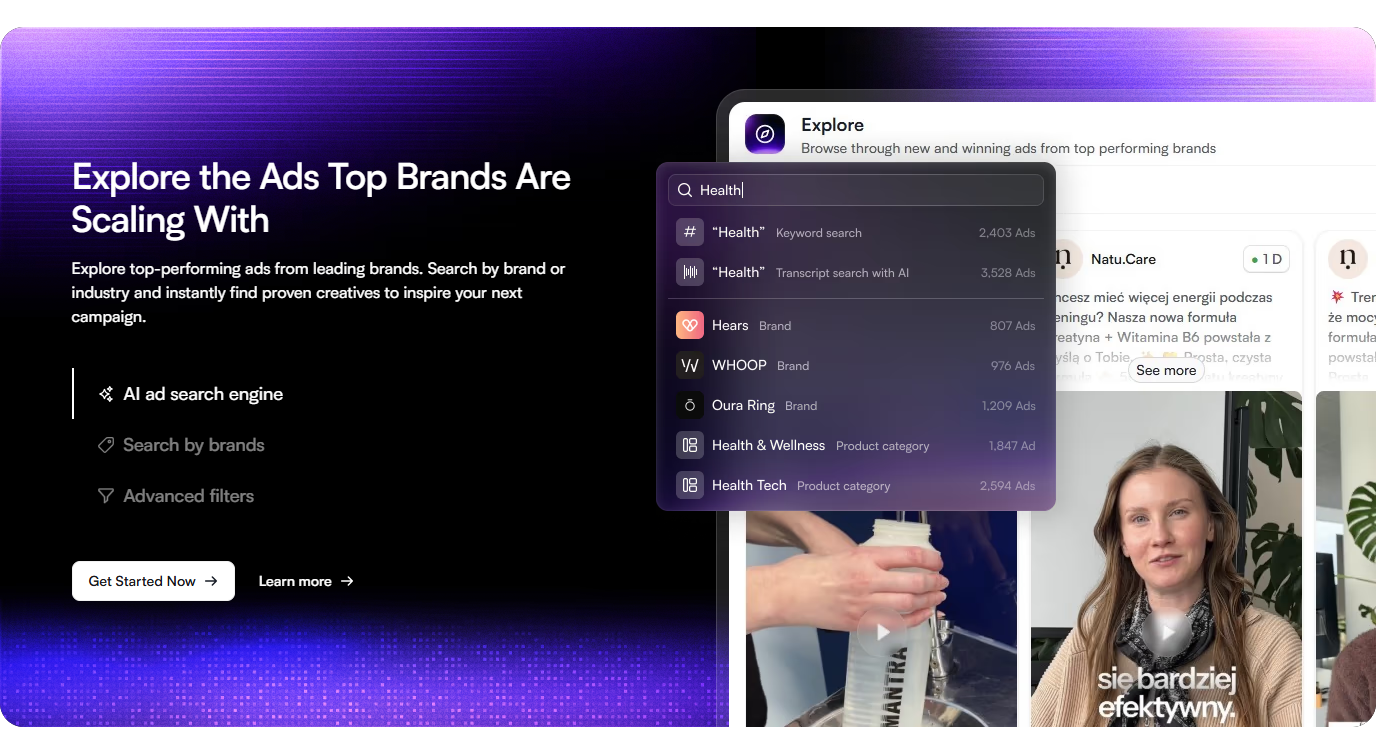
Where Scout is about following specific competitors over time, Explore is about open-ended discovery. It’s positioned as an AI-powered ad search engine that lets you browse top-performing ads from leading brands across categories, searchable by brand name or industry, with advanced filtering on top.
The use case here is different from Scout. You’re not monitoring five known rivals — you’re fishing in a much bigger pond, looking for creative patterns and inspiration outside your immediate competitive set. A skincare brand might look at what a completely unrelated supplement company is doing with its hook structure, because strong creative patterns often transfer across categories even when the product doesn’t.
One testimonial captures this well: a user described being able to filter by impressions and instantly surface what’s actually spending at scale in their niche, instead of scrolling aimlessly through the raw Meta Ad Library for hours. That’s the core promise of Explore — turning an unstructured, chronological ad archive into something you can actually query with intent.
This is a genuinely useful complement to Scout rather than a redundant feature. Competitor tracking tells you what your direct rivals are doing; a searchable discovery engine tells you what’s working across an entire category or format, which is often where the freshest creative ideas actually come from.
Collections: Killing the Screenshot Graveyard
Every marketing team has some version of the same problem: creative inspiration scattered across Slack threads, personal screenshot folders, and half-abandoned Pinterest boards. Nobody can find anything when they actually need it, and by the time a campaign brief goes out, half the “inspiration” that was gathered has evaporated into someone’s camera roll.
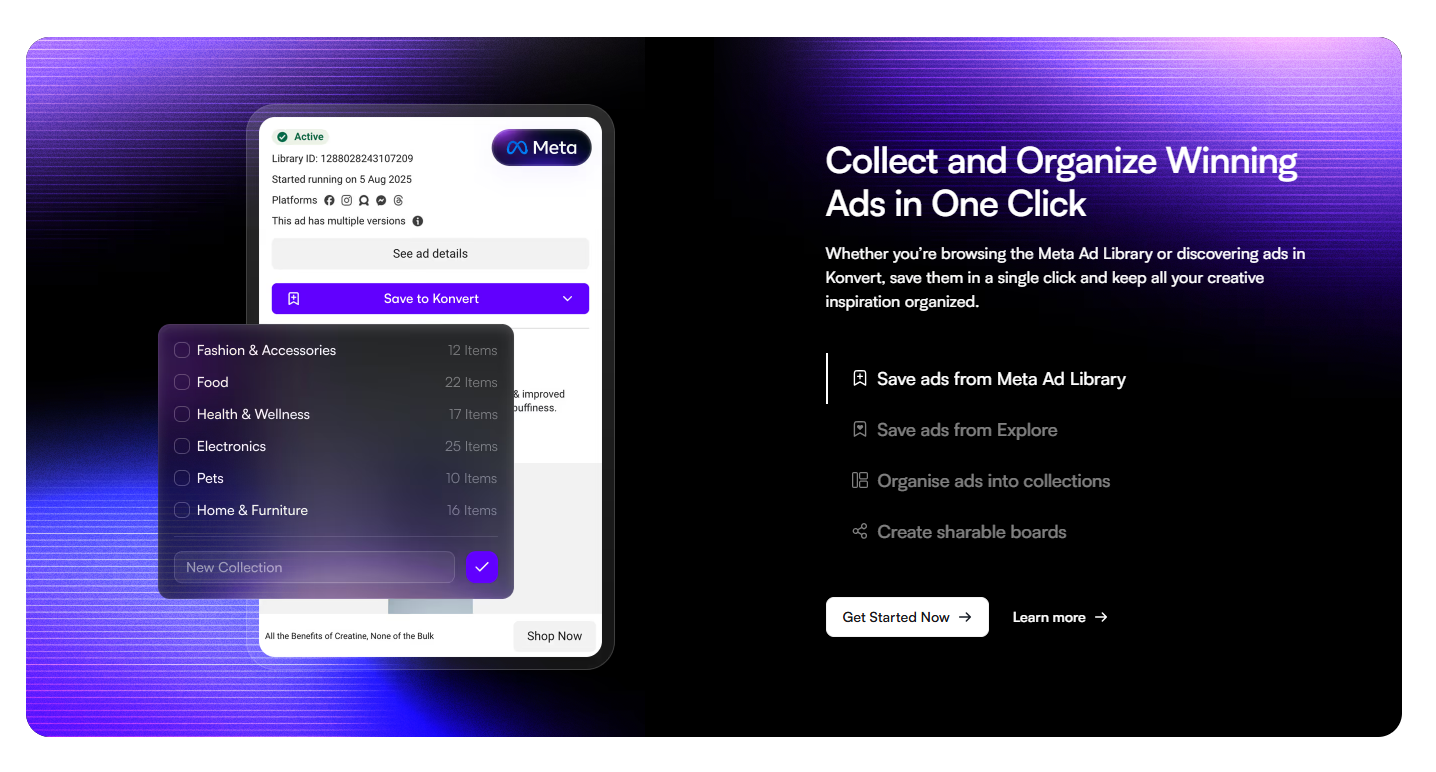
Collections is Konvert’s answer to that mess. It lets you save ads with a single click — whether they’re sourced from the native Meta Ad Library (via the Chrome extension) or discovered inside Explore — and organize them into collections that can be shared across a team as boards.
This is a small feature on paper, but it’s the kind of quality-of-life improvement that determines whether a tool actually gets used daily or gets abandoned after the first week. A testimonial on the site nails the actual pain point being solved: teams saving ads into shared Collections instead of dumping screenshots into Slack, so everything stays organized and findable instead of disappearing into scroll-back oblivion.
If you’ve ever tried to find “that one ad someone shared three weeks ago” in a Slack channel with 40 unread messages, you understand exactly why this matters.
AI Canvas: Where Research Turns Into a Finished Ad
This is the most ambitious piece of the puzzle, and the one that pushes Konvert from “research tool” into “production tool.” AI Canvas is described as a central, collaborative visual board where you organize ideas, pull in inspiration, and generate finished ad creative using AI — all in the same workspace.
Specific capabilities include:
- Generating ad scripts with AI
- Access to multiple leading AI models inside one chat interface
- Generating static ad images with AI
- Real-time team collaboration on a shared canvas
The pitch is essentially: stop copy-pasting your research into ChatGPT in a separate tab, then copy-pasting the output into Canva in yet another tab. Do the whole loop — research, ideation, generation, refinement — without ever leaving the canvas.
This is also the feature most likely to keep evolving quickly, since AI ad generation is a fast-moving space where quality benchmarks shift every few months. Whether Konvert’s AI-generated static ads hold up against a skilled human designer, or against dedicated AI ad-generation tools built for nothing else, is something worth judging with your own eyes and your own brand assets rather than taking on faith. AI-generated creative in this category has ranged from genuinely production-ready to obviously synthetic depending on the tool and the month you tested it, so this is the one module I’d recommend piloting hardest before building a workflow around it.
The Konvert MCP: A Notable, Forward-Looking Touch
One detail that stood out and is worth calling out on its own: Konvert offers an MCP (Model Context Protocol) integration that connects the platform directly to Claude. For readers less familiar with MCP, it’s essentially a standardized way for AI assistants to securely pull in data from — and take actions inside — third-party tools, rather than being limited to whatever’s in their training data or a single chat window.
Practically, this means someone using Claude could, in theory, ask it to reference their Konvert data — saved collections, tracked competitor insights, and so on — directly inside a conversation, instead of manually exporting things and pasting them in. This is a genuinely forward-thinking move for a niche martech tool. A lot of companies in this space are still treating AI as a single “generate content” button bolted onto their existing product. Building an actual protocol-level integration signals that Konvert is thinking about how AI assistants will be used as a workflow layer across tools going forward, not just as a content generator inside their own app.
It’s a small feature in terms of screen real estate on the marketing site, but it’s a meaningful signal about product direction.
Who Is This Actually Built For?
Konvert positions itself broadly, but the use cases break down cleanly by team type:
E-commerce brands get the most direct value — fast access to proven creative structures and real-time visibility into what’s driving spend in their category, which matters enormously when ad costs are the single biggest lever on margin.
SaaS companies benefit from the research side more than the template side, since B2B creative often needs more customization than a plug-and-play static template can offer. Discovering which hooks and landing pages are converting in a crowded SaaS category is the real draw here.
Agencies are arguably the best-fit customer. Managing multiple client accounts means constantly re-researching competitors and constantly needing fresh creative directions. A tool that centralizes tracking, discovery, and production across accounts — rather than requiring a separate spreadsheet and Canva workspace per client — solves a real operational headache. One testimonial specifically speaks to this: an agency describing how Konvert helps them “create winning ads for our clients’ brands” with performance improvements “across all of our client accounts.”
Marketers and media buyers get a faster feedback loop for testing new angles, without needing to build creative from a blank page every time a campaign underperforms.
Designers and editors get a starting point that isn’t a blank canvas — which, for anyone who’s stared down a design brief with zero direction, is worth a lot on its own.
Dropshippers get early-warning signals on trending ads before a niche gets saturated, which is the entire game in that particular business model.
Pricing and Trial Policy
Konvert does not offer a free trial. Instead, every subscription is backed by a satisfaction guarantee — if you’re unhappy within the first week, you can email support and they’ll take care of it, according to the company’s own FAQ. Plans can be upgraded, downgraded, or canceled at any time from account settings, and cancellations remain active through the end of the current billing period rather than cutting off access immediately.
The lack of a free trial is a real trade-off worth weighing. On one hand, it filters out low-intent signups and, per the company’s framing, lets them invest resources into the product rather than trial infrastructure. On the other hand, it means you’re taking the plunge somewhat on faith, relying on the refund-style guarantee rather than kicking the tires first. If you’re on the fence, it’s worth reading independent user reviews closely, and going in with a clear checklist of what you want to test in that first week — Scout’s data freshness on a competitor you know well, a handful of AI Canvas generations against real brand assets, and whether the template filtering actually surfaces relevant work for your specific niche.
What Konvert Does Well
One connected pipeline, not five disconnected tools. This is the whole reason to consider Konvert over piecing together a free Ad Library search, a separate spy tool, a Canva subscription, and a spreadsheet. If the modules genuinely talk to each other — saved research feeding into AI Canvas, Collections feeding into template inspiration — that integration is the actual product, more than any single feature in isolation.
Templates that don’t lock you into a bad editor. Exporting to Canva or Figma respects the fact that teams already have design workflows, rather than forcing a rebuild around a proprietary tool.
Genuine competitive intelligence, not just a static archive. Scout’s continuous monitoring plus AI-surfaced insights is a meaningfully more useful product than a searchable ad database alone.
Forward-looking AI integration. The Konvert MCP connection to Claude suggests the team is building for how AI-assisted workflows are actually evolving, not just adding a chatbot for novelty’s sake.
Team-first design. Shared Collections and a collaborative AI Canvas suggest this was built with agencies and multi-person marketing teams in mind, not just solo operators.
What to Watch Out For
No free trial means real commitment upfront. The satisfaction guarantee softens this, but it’s still a leap of faith relative to competitors that let you poke around before paying.
AI-generated creative quality will vary. As with any AI image/copy generation feature, results are only as good as the underlying models and how well they’re tuned to advertising-specific constraints (aspect ratios, platform compliance, brand consistency). Test this specifically with your own brand before building a full workflow around it.
Scraper coverage and speed need to be verified firsthand. The value of Scout is entirely dependent on how comprehensively and quickly it catches new competitor ads. This is hard to evaluate from marketing copy alone and is worth testing against competitors you already track manually.
A broad target market can mean shallower fit for niche use cases. Serving e-commerce brands, SaaS companies, agencies, and dropshippers simultaneously is ambitious. Depending on your specific vertical, you may find the template and filter granularity better suited to some categories than others.
The Verdict
Konvert is going after a real and often underserved problem: the ad creative workflow for most teams is genuinely fragmented, spread across a browser tab for competitor research, another for inspiration, a design tool, and some kind of shared drive that nobody keeps organized. Whether or not any single module here is the best in class version of that feature — the best template library, the best ad spy tool, the best AI image generator — the more interesting bet Konvert is making is that a well-integrated good enough version of all four beats a disconnected excellent version of any one of them.
For agencies juggling multiple client accounts, that integration argument is especially compelling — the operational overhead of switching between five tools per client, multiplied across ten clients, is exactly the kind of friction a unified platform is built to eliminate. For solo DTC founders or small in-house teams, the templates and Scout modules alone likely justify a serious look, provided the no-free-trial policy doesn’t scare you off from testing the waters.
The most exciting long-term signal, though, might be the smallest feature on the page: the Konvert MCP integration with Claude. It suggests a team thinking not just about today’s dashboard-and-button AI features, but about how ad research and creative production will actually get done a year or two from now — inside conversational, agentic workflows rather than siloed apps. If that vision holds up as the product matures, Konvert could end up being less of an ad-spy tool with AI bolted on, and more of the connective layer between AI assistants and the entire ad-creation pipeline.
Worth a serious pilot if your team is currently duct-taping together four different tools just to launch one ad.