
 Gigachad Garen
Instead of asking users to become amateur graphic designers, layout architects, and copywriters, Landingsite.ai replaces the manual editing canvas with a conversational, intent-driven generation engine. Claiming over one million websites created and an average build time of roughly five minutes, the platform promises a complete digital presence—design, professional copy, custom logo, custom domain, hosting, e-commerce, and client invoicing—generated from just two foundational business prompts.
Does Landingsite.ai deliver on its promise of an autonomous, business-ready website, or does it succumb to the generic hallucinations and shallow aesthetics that have plagued early generative web tools? This review takes a deep, critical look into its architecture, core feature suite, operational workflows, and competitive standing.
Most website builders start with a high-friction decision matrix: pick an industry, select from hundreds of visually interchangeable templates, configure font pairings, and stare down a blank canvas populated with generic placeholder text.
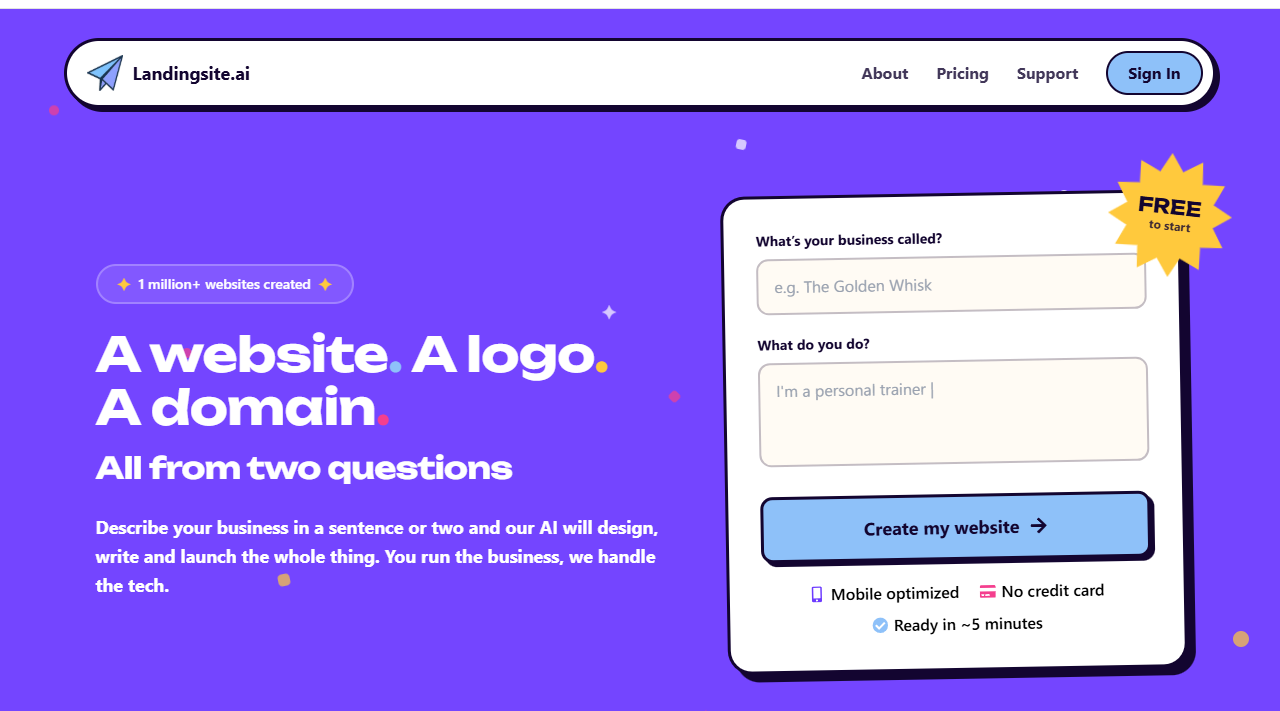
Landingsite.ai upends this onboarding flow by reducing the initial barrier to two plain-text inputs:
- What is your business called?
- What do you do?
What Happens Under the Hood?
Behind that minimalist prompt box, the system executes an automated pipeline of semantic analysis, layout orchestration, and asset generation:
- Semantic Extraction & Industry Classification: The engine parses the prompt for industry verticals, operational scope, target audience, and geographic anchoring. Entering “Custom composite deck construction in Portland” provides the system with both a trade classification and a local SEO anchor.
- Structural Layout Assembly: Rather than simply pulling a static JSON template from a library, the platform synthesizes section layouts based on conversion standards proven for that vertical. A home services company receives a prominent trust badge section, an interactive quote request module, a gallery framework, and customer testimonials. A consulting firm receives thought leadership blocks, client logos, and appointment hooks.
- Contextual Copywriting: The text output sidesteps placeholder copy entirely. The system writes industry-tailored value propositions, service descriptions, calls-to-action, and company mission statements that read like the work of an experienced conversion copywriter.
- Automated Asset & Color Paletting: The algorithm establishes an aesthetic hierarchy—pairing complementary serif or sans-serif typography with a balanced color scheme that matches the industry mood (e.g., earthy greens and warm browns for timber decking; clean blues and slates for legal or financial services).
Within three to five minutes, users transition from a blank prompt to a fully realized multi-page or deep-scroll web presence, complete with imagery, iconography, and structured content ready for review.
To understand whether Landingsite.ai is a sustainable business platform or merely a novelty generator, we must evaluate its individual functional components. Below is a detailed breakdown of the platform’s core feature set.
Feature 1: Context-Aware Copywriting and Dynamic Layouts
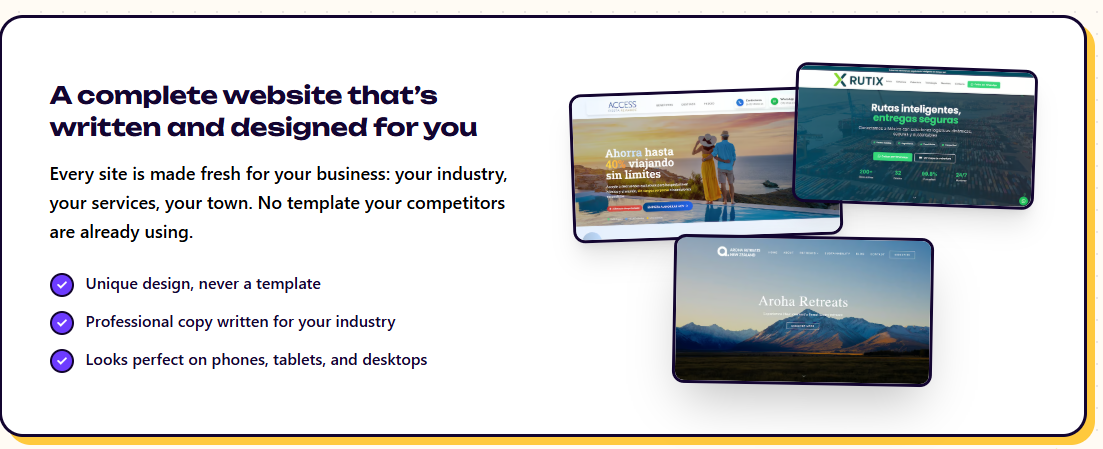
The single greatest failure point of modern web builders is the content gap. Users routinely spend days picking a visual template, only to stall indefinitely when tasked with writing their own headlines, feature summaries, and value propositions.
Landingsite.ai approaches design and copy as an integrated whole:
- Zero Placeholder Syndrome: There is no generic filler anywhere on the generated site. The system produces persuasive headlines, service overviews, and contextual microcopy designed specifically to turn casual visitors into inbound leads.
- Hyper-Localized Content Integration: If a business specifies an operating location, the platform weaves geographic references into the copy and local SEO metadata. Mentioning a specific neighborhood, city, or service radius enables the system to generate localized headers that improve discovery in local map packs and organic search.
- Dynamic Section Architecture: The platform generates dedicated sections
tailored to the business’s industry requirements:
- Dynamic pricing tables with toggleable tiers.
- Verified review containers and social proof modules.
- FAQ accordions addressing typical customer objections.
- Interactive contact points and localized service areas.
Feature 2: Automated Brand Identity and Logo Generation
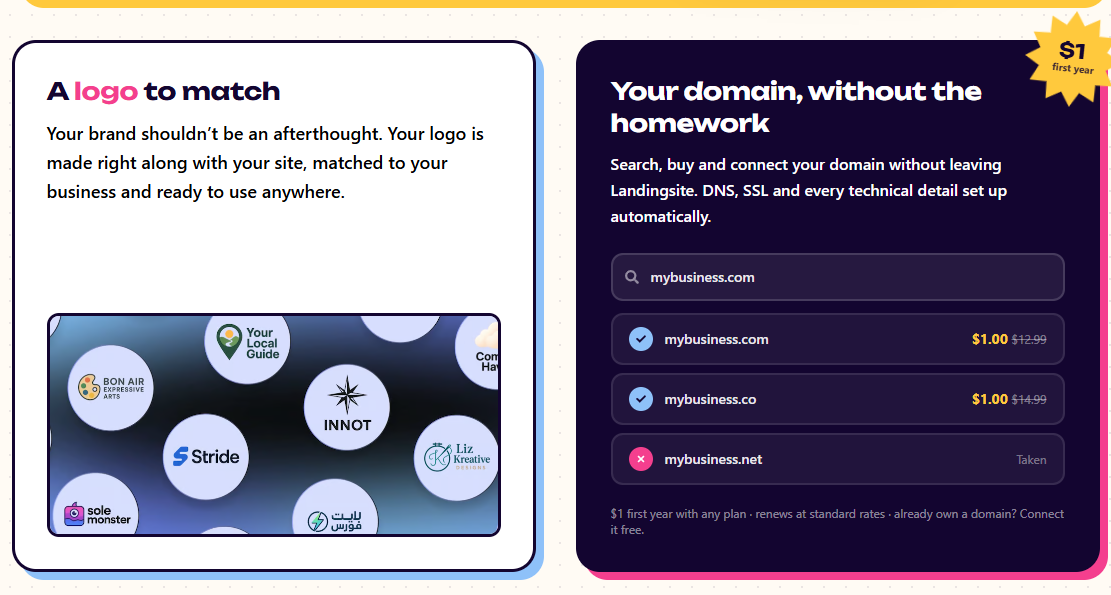
For solo entrepreneurs and local service providers, brand assets are often a messy afterthought. Business owners frequently paste mismatched low-resolution graphics onto an otherwise clean template, ruining visual consistency.
Landingsite.ai treats brand synthesis as a core part of site generation rather than a separate tool:
- Aesthetic Alignment: The generated logo matches the site’s typography and primary color accents. If the AI selects an emerald and slate palette with geometric typography, the logo mirrors that exact aesthetic.
- Vector Output & Favicon Handling: The logo renders cleanly across all screen sizes, scaling from high-resolution display viewports down to a crisp browser favicon without manual cropping or exporting.
- Omnichannel Brand Deployment: The created logo is automatically integrated into invoice headers, customer-facing emails, checkout receipts, and the site’s navigation bar, ensuring consistent branding across all touchpoints.
Feature 3: The Conversational Editor (“Edit by Chat”)
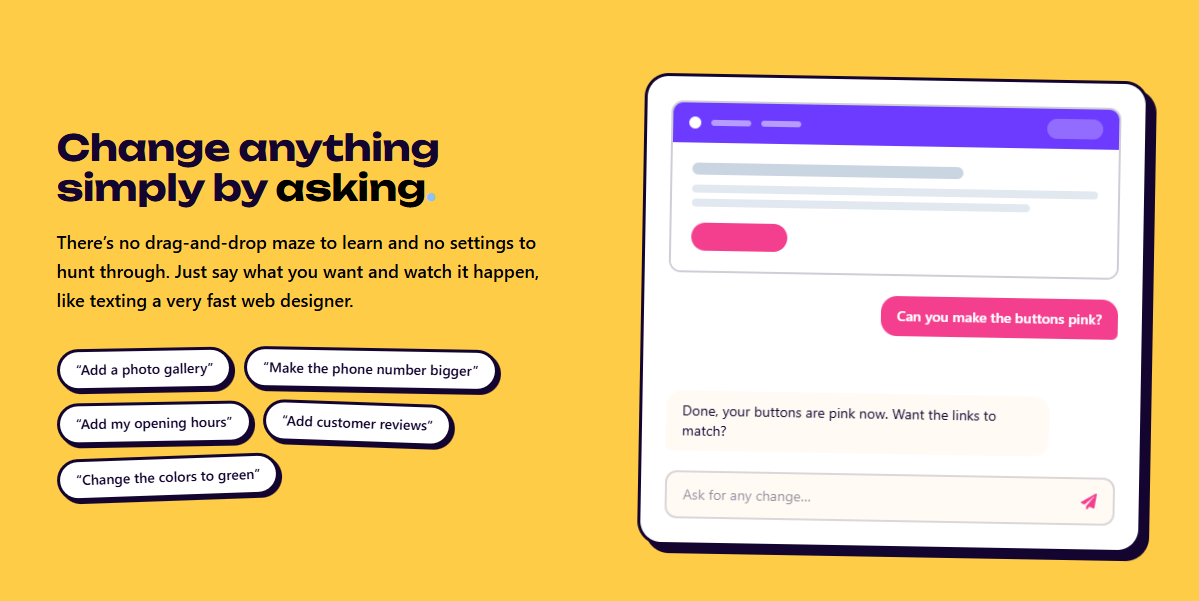
Traditional visual builders subject users to dense toolbars, nested flexbox settings, z-index sliders, and complex breakpoint selectors. Landingsite.ai sidesteps this complexity entirely with its conversational editor, replacing manual controls with natural language commands.
Instead of manually navigating panels to change styles, users issue direct instructions in plain text:
- “Can you make the primary buttons dark green and round the corners?”
- “Add an FAQ section addressing our 3-year warranty and weatherproofing.”
- “Make the phone number in the top header larger and bolder.”
- “Add a three-column customer testimonial section with five-star ratings.”
Why Conversational Editing Outperforms Visual Drag-and-Drop:
- Immunity to Layout Breakages: In typical drag-and-drop builders, dragging an image container often breaks the underlying grid, causing text overflows on mobile viewports. Landingsite.ai compiles natural language instructions into strict, programmatic UI changes, ensuring that every modification preserves responsive layout integrity.
- Speed of Execution: Writing a command like “Add a pricing section with three tiers ($29, $49, $99) highlighting the middle tier” takes roughly five seconds. Building the same component manually in a visual builder requires creating containers, aligning columns, styling typography, creating badges, and adjusting margin spacing across three separate breakpoints.
- No Technical Barrier: Edits do not require an understanding of CSS properties like padding, margins, flexbox alignment, or hex codes. The engine maps everyday conversational requests directly to valid design tokens.
Feature 4: Domain Orchestration and Serverless Infrastructure
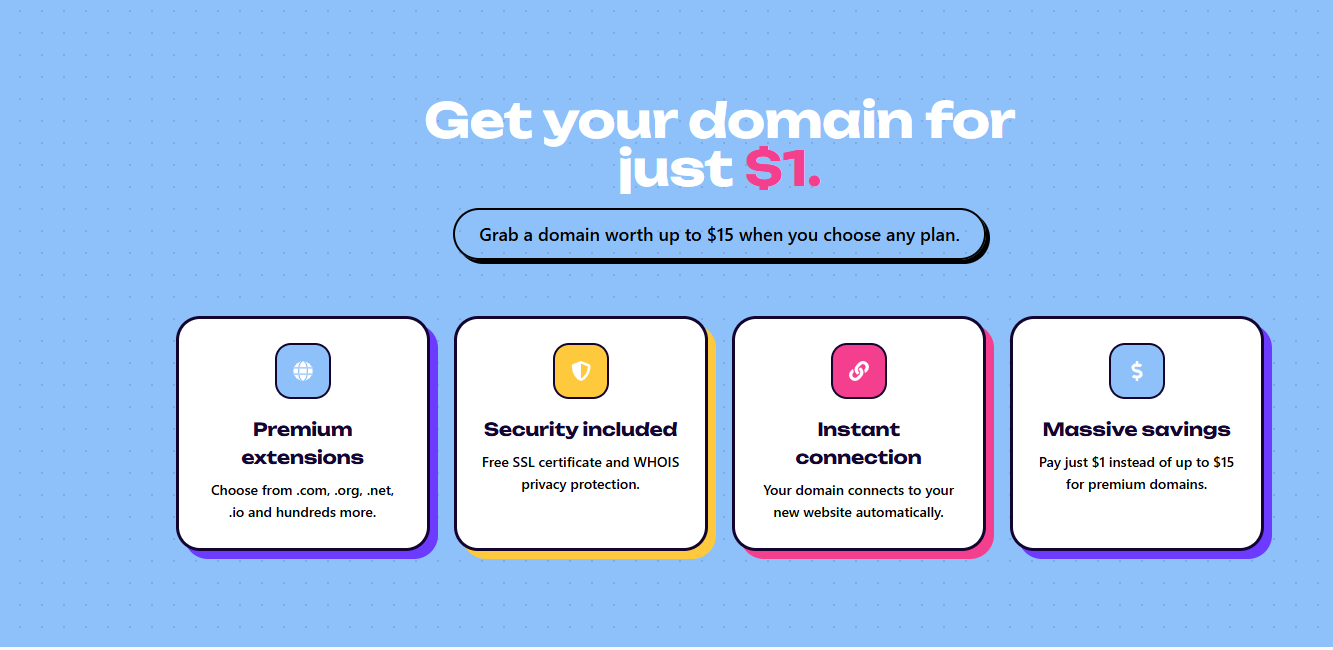
Connecting a domain to a modern website builder is traditionally a frustrating experience. Users are often forced to log into third-party registrars, navigate confusing DNS control panels, and configure @ and CNAME records while waiting hours for DNS propagation.
Landingsite.ai streamlines this entire process down to a single workflow:
- Integrated $1 Domain Provisioning: Users can search for, register, and connect top-level domains (e.g., .com, .co, .net) directly from the dashboard, starting at $1 for the first year.
- Zero-Configuration DNS and SSL: The platform handles DNS mapping automatically upon checkout. Free SSL certificates are issued and renewed automatically, securing user sites right out of the box without manual certificate generation or verification.
- Global Edge Hosting: Sites run on modern cloud infrastructure, delivering assets via distributed content delivery networks (CDNs). This ensures rapid Time to First Byte (TTFB), pre-compressed asset delivery, and reliable uptime without requiring users to configure caching plugins, PHP updates, or database maintenance.
- BYOD (Bring Your Own Domain): For users who already own a domain through registrars like Cloudflare, Namecheap, or GoDaddy, Landingsite provides clean, simplified nameserver and record mapping instructions to connect their existing domain without extra fees.
Feature 5: Native E-Commerce and Digital Storefronts
Many entry-level builders claim e-commerce functionality, but in practice, it often amounts to nothing more than an unstyled, embedded PayPal button. Landingsite.ai provides a fully integrated storefront engine capable of managing end-to-end commerce operations.
Key e-commerce capabilities include:
- Physical and Digital Catalogs: Merchants can sell tangible goods that require shipping information alongside digital assets (e.g., PDFs, software licenses, audio files) that deliver automated download links upon purchase.
- Variant and Inventory Management: Store owners can configure complex product matrices—such as sizes, colors, and materials—with dedicated SKU tracking, custom pricing, and stock depletion counters.
- Automated Checkout Calculations: The checkout workflow automatically calculates regional sales taxes and dynamic shipping fees based on the customer’s delivery destination.
- Promotion and Coupon Architecture: Merchants can create percentage-based or fixed-value discount codes with custom redemption limits, expiration dates, and minimum spend rules.
- Integrated Reviews: Product pages feature built-in customer review collection, displaying verified buyer badges and star ratings directly on the storefront to boost conversion rates.
Feature 6: Conversational Invoicing and Billing
For service-based professionals—such as contractors, landscapers, interior designers, and consultants—a standard shopping cart makes little sense. These businesses rely primarily on estimates, itemized invoices, and post-service billing. Landingsite.ai addresses this need by building a lightweight invoicing system directly into its conversational core.
- Conversational Invoice Creation: Users can issue commands like: “Create an invoice for Maria Lopez: $300 for deck repair labor, $50 for materials, due on Friday.” The system immediately formats an itemized, branded invoice complete with payment links.
- Automated Email Dispatch and Follow-ups: The client receives a clean, mobile-optimized digital invoice via email, allowing them to pay securely via credit card, Apple Pay, or bank transfer through Stripe. If the invoice passes its due date without payment, the platform can send automated reminder emails to minimize overdue accounts.
- Accounts Receivable Tracking: Business owners can view invoice statuses at a glance to see which invoices are paid, pending, or overdue, without needing a standalone accounting subscription like QuickBooks or FreshBooks for simple service billing.
Feature 7: Recurring Memberships and Subscription Commerce
For gyms, yoga studios, content creators, and subscription-box brands, recurring revenue is essential. Landingsite.ai includes native subscription features directly within its commerce tier.
- Flexible Billing Intervals: Businesses can configure recurring billing on a weekly, monthly, quarterly, or annual basis.
- Customer Self-Service Portal: Subscribers receive access to a self-service management interface where they can update payment methods, upgrade tiers, or cancel their subscriptions without requiring manual intervention from the site owner.
- Automated Dunning and Renewals: If a recurring card payment fails, the system triggers automated retry logic and dunning notices to recover the subscription before it cancels.
Feature 8: The Embedded AI Business Operations Assistant
Landingsite.ai’s most forward-looking feature is its shift from a static web builder to an active business operations dashboard.
Most platforms leave business owners digging through analytics sub-menus and export spreadsheets to understand site performance. Landingsite embeds an AI operational assistant that bridges the gap between the website, store transactions, and site analytics, responding to everyday operational queries via chat.
This conversational assistant turns the dashboard into an operational command center:
- Financial Monitoring: Summarizes gross margins, transaction volumes, payout schedules, and product performance.
- Accounts Receivable Management: Tracks outstanding balances and dispatches payment reminders on demand.
- Conversational Traffic Analytics: Translates raw traffic data into clear answers, such as: “You had 212 visitors this week, up from 180. Approximately 68% arrived via local Google searches for deck contractors.”
- Autonomous Promotional Actions: Users can trigger store updates conversationally, like: “Run a 15% discount on all cedar treatments this weekend.” The assistant creates the discount code, updates the hero banner to advertise the sale, and schedules the end date automatically.
Feature 9: Form Automation and Built-In Spam Filtering
Lead capture forms are a staple for service businesses, but they often present significant problems: unconfigured SMTP servers, missing notification emails, and inbox spam submissions.
Landingsite.ai provides an automated, zero-configuration form framework:
- Inbox Delivery: Leads submitted through contact forms land directly in the business owner’s primary email inbox, with no third-party email routing setup required.
- Server-Side Anti-Spam Filtering: Form submissions run through automated anti-spam algorithms that strip out automated bot traffic, link spam, and scraping attempts without forcing visitors through frustrating, conversion-killing CAPTCHA puzzles.
- Lead Ingestion into the Assistant: Inbound messages feed directly into the AI assistant’s context. Store owners can ask: “Show me the new quote requests from this week,” and view incoming leads organized by urgency and scope.
Feature 10: Localization, Multilingual Support, and Compliance
Expanding into international markets or operating in multilingual regions often requires complicated plugin setups like WPML or complex localized subdirectories.
Landingsite.ai natively supports localization:
- 150+ Language Deployment: The platform can translate site copy, forms, and product catalogues into more than 150 languages, tailoring phrasing to the target language rather than relying on awkward, literal translations.
- Integrated Privacy Banners: Sites include pre-configured, customizable cookie consent banners that help satisfy GDPR and CCPA requirements out of the box, without requiring external script tags or compliance subscriptions.
To evaluate how Landingsite.ai handles different operational requirements, we tested the platform by spinning up two distinct business prototypes: a local service contractor and a digital subscription service.
Scenario A: The Local Service Craft (“Iron & Shears Barbershop”)
Initial Input:
- Business Name: Iron & Shears Barbershop
- Business Description: High-end traditional men’s grooming, hot towel shaves, and beard sculpting in Austin, Texas. We take walk-ins, offer online bookings, and sell our own line of organic pomades and beard oils.
Generation Output (~3 minutes):
- Aesthetic: Dark industrial tones, warm bronze accents, and vintage serif typography that fit the traditional barbershop look.
- Content Architecture: A prominent hero section (“Austin’s Home for Master Barbering & Classic Hot Towel Shaves”), followed by an itemized service menu with transparent pricing, an “Our Story” section highlighting the shop’s heritage, an embedded Google Maps module, and a product carousel showcasing beard oils and pomades.
- The Edit Test: We issued the conversational command: “Add a note at the top of the service menu stating that complimentary craft espresso or cold brew is served with every appointment.” The assistant added an elegant announcement pill directly above the pricing grid within five seconds.
- The Commerce Test: The shop was pre-configured with two physical retail products. Tax settings for Texas were applied automatically, and checkout routes routed through Stripe without incident.
Scenario B: The Digital Membership Platform (“FlowState Studio”)
Initial Input:
- Business Name: FlowState Studio
- Business Description: On-demand and livestream daily Vinyasa yoga, breathwork, and guided meditation classes for busy remote workers.
Generation Output (~4 minutes):
- Aesthetic: Minimalist, calm design utilizing muted sage greens, stone whites, and clean sans-serif typography.
- Content Architecture: An engaging video-ready hero header, a three-column value proposition highlighting mental clarity and stress relief, a membership tier comparison table, and an FAQ section addressing class difficulty and required equipment.
- The Edit Test: We asked the assistant: “Create a two-tier subscription toggle: Monthly at $29/mo, and Annual at $290/year with a badge saying ‘Get 2 Months Free’.” The assistant updated the pricing component with a functional monthly/annual toggle and added the promotional tag to the annual card.
- The Subscription Flow: Clicking “Sign Up” opened a clean checkout modal requesting customer details and payment credentials, setting up a recurring monthly subscription with automated customer portal access.
How does Landingsite.ai compare to industry standard platforms like Framer, Webflow, Squarespace, and Shopify? The table below highlights key operational differences:
| Evaluation Metric | Landingsite.ai | Squarespace / Wix | Framer | Shopify |
|---|---|---|---|---|
| Primary Target User | Solo founders, SMBs, service pros | General consumers, small business | Modern designers, startups | Dedicated e-commerce brands |
| Initial Build Time | ~5 minutes | 3 to 10 hours | 1 to 3 days | 1 to 5 days |
| Interface Model | Conversational (Natural Language) | Visual Drag-and-Drop | Canvas / Figma-style layout | Form / Theme Customizer |
| Copywriting | Contextual AI-generated | Manual / Light AI prompts | Manual copywriting | Manual copywriting |
| Integrated Invoicing | Yes (Conversational) | Requires third-party extensions | No | No (Requires dedicated apps) |
| Logo Generation | Fully integrated | Standalone / Basic add-on | No | Separate logo maker |
| Hosting & SSL | Included edge infrastructure | Included | Included | Included |
| Deep CSS/Code Control | Limited (Guardrailed) | Moderate (via code blocks) | High (React, code components) | High (Liquid, full CSS/JS) |
| Transaction Fees | Stripe fees + 1% platform fee | Varies by plan (0%–3%) | 0% (Uses external checkout) | 0%–2% depending on plan |
The Key Trade-Off
Choose Landingsite.ai if speed to launch, conversational simplicity, and an all-in-one platform (design, domain, copy, logo, invoicing, and store) are your top priorities. It eliminates the manual work of building and maintaining a site.
Choose Framer or Webflow if you are a professional designer who requires complete control over custom scroll physics, bespoke CSS animations, complex database structures, and precision breakpoints.
Choose Shopify if your primary goal is scaling an e-commerce business with thousands of SKUs, complex warehouse logistics, and enterprise inventory requirements.
No platform is right for every use case. While Landingsite.ai excels at removing friction for busy entrepreneurs, it makes intentional trade-offs that power users and technical developers should consider.
1. Guardrailed Layouts (The Anti-Pixel-Pusher Architecture)
If you want to drag a button three pixels to the left, adjust overlapping z-indices manually, or write custom scroll animations, Landingsite.ai will feel restrictive.
The platform uses guardrailed layouts to ensure the conversational editor doesn’t break mobile responsiveness. Edits that violate clean responsive design principles are either corrected or rejected by the system. For entrepreneurs, this is a safety net; for visual designers, it can feel like a constraint.
2. Not Built for Complex Web Applications
Landingsite.ai is designed for marketing sites, lead capture, service operations, e-commerce, and memberships. It is not a full-stack web application builder:
- It cannot host custom SaaS databases with complex relational tables.
- It does not support third-party user authentication flows outside its built-in client and subscriber portals.
- It does not feature an open marketplace of thousands of third-party plugins like WordPress or Shopify.
3. The 1% Platform Fee on Commerce Transactions
While Landingsite.ai’s commerce engine is simple to set up, the Pro plan adds a 1% platform fee on top of Stripe’s standard card processing fees.
For a local barber or consultant processing $3,000 to $10,000 a month in services, a 1% fee ($30–$100) is often a worthwhile trade-off for an all-in-one platform that handles hosting, invoicing, domains, and site updates.
However, for high-volume, low-margin retail stores processing $100,000+ monthly in physical goods, that 1% fee adds up quickly. At that scale, a dedicated e-commerce platform like Shopify or a custom WooCommerce installation may be more cost-effective.
4. Ecosystem Portability
Websites built on Landingsite.ai are designed to live within its managed cloud infrastructure. You cannot export raw static code (HTML/CSS/JS) to host on your own AWS S3 bucket or cPanel server. While you own your domain, customer records, and product databases, the rendering engine is tied to the platform.
High-Fit Categories
- Home Services and Local Trades: Electricians, deck builders, roofers, landscapers, and cleaning services. These businesses need professional design, local SEO discoverability, clean lead capture, and hassle-free invoicing, without spending weeks fiddling with software.
- Consultants, Coaches, and Solo Professionals: Independent accountants, business coaches, therapists, and marketing consultants benefit from the conversational invoicing, appointment hooks, and integrated brand identity.
- Agencies and Freelancers: Digital agencies can use Landingsite.ai to rapidly deploy functional staging environments or turn around high-margin, low-overhead micro-sites for local business clients in an afternoon.
- Event Organizers and Pop-Up Ventures: Launching an annual conference, local festival, or pop-up boutique requires a high-converting digital storefront in hours, not weeks.
To view Landingsite.ai as just another visual site editor is to misunderstand where web software is heading.
The last decade was defined by visual democratization: tools like Wix and Squarespace made web development accessible to non-programmers, but they still required users to act as manual designers, layout artists, and webmasters. They digitized the tools, but they didn’t reduce the actual workload.
Landingsite.ai represents a clear step toward intent-based computing:
- You describe your business intent; the system handles execution.
- You request operational outcomes; the AI handles implementation.
- Instead of digging through dashboards, you interact with an assistant that knows your business.
By combining brand generation, edge hosting, natural language editing, conversational invoicing, and business analytics into a unified interface, Landingsite.ai shifts the user’s role from manual web designer to executive director.
Landingsite.ai delivers an impressive, end-to-end web generation platform. By eliminating the blank canvas, manual DNS setup, and the friction of traditional drag-and-drop interfaces, it solves the real problems that keep businesses from launching a professional online presence.
While it won’t replace complex web application platforms like Webflow or dedicated retail engines like Shopify for enterprise projects, it doesn’t try to. For solo founders, local contractors, consultants, and lean entrepreneurs who need a polished, modern, money-making website up and running in minutes, Landingsite.ai sets a compelling new benchmark for what modern web creation should look like.